
Personal projectPrivate project
CRM — AI Chatbot & Customer Operations
A personal AI chatbot platform for customer support, with visual agent workflows, connected business tools, and per-agent guardrails.
- My role
- Solo full-stack developer · AI-assisted
- Year
- 2026
- Built with
- TanStack Start / TanStack AI / Hono
The overview
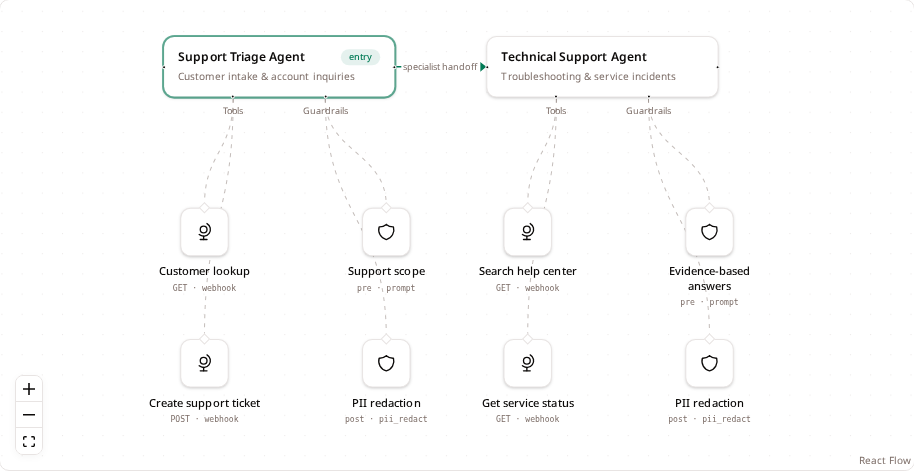
CRM is my personal AI chatbot project for customer support and customer operations. It brings chatbot conversations, channels, AI agents, and team operations into one workspace. A visual workflow graph makes agent responsibilities, connected tools, and response policies visible, including handoffs from a triage agent to specialist agents. Users can bring their own AI API key.
My contribution
I built the project solo across the frontend and backend, using AI assistance during development. My work brings together the customer operations interface and agent workflow configuration, including handoffs, tool attachments, and per-agent guardrails.
What it does
AI customer support chatbot
Use AI agents to handle customer inquiries through connected channels, with tools for retrieving context and handoffs to specialist agents.
Visual agent workflows
Configure entry agents and specialist handoffs for each channel, with responsibilities and capabilities visible in one graph.
Connected business tools
Attach webhook tools to the agents that need them, supporting tasks such as customer lookup, ticket creation, and knowledge search.
Per-agent guardrails
Define response scope and evidence requirements with prompt guardrails, and apply PII redaction to outgoing responses.
Conversation workspace
Bring channels, conversations, and agent runs together so workflows can be reviewed and refined with context.
Bring your own AI key
Users can configure their own AI API key for the workspace.
How it’s built
I built CRM with TanStack Start, TanStack AI, and Hono, working across the full stack with AI-assisted development. The workflow connects agent roles to their tools and guardrails, keeping configuration visible alongside the conversation workspace.